



Point of this article..
- Google introduces Focused Banner Ads (Beta) as a new format to increase the visibility of banner ads for web on pages with text-based content.
- This format works on standard inline banner ad slots that already exist on publisher websites.
- This new format has the potential to increase ad viewability and website monetization performance without disrupting the user experience.
Focused Banner Ads (Beta) in Google Ad Manager is a new banner format designed to improve the visibility of banner ads for web without disrupting the reading experience.
What Is Google Ad Manager?
Before discussing the latest banner ads update in more detail, it is important to first understand what Google Ad Manager is.
Google Ad Manager is a platform from Google used by publishers to manage, display, and optimize ads on websites or applications.
With Google Ad Manager, website owners can:
- manage ad placements
- manage various types of ad formats
- collaborate with advertisers or ad networks
- maximize revenue from website traffic
Where Are Banner Ads Usually Displayed on a Website?
Banner ads are usually placed in areas that are easy for website visitors to see.
1. Top of the Page (Header Banner)
This is one of the most popular positions because it is the first area visitors see when opening a website. Usually, the banner size in this area is quite large to easily attract attention.
2. In the Middle of an Article
Banners are also often placed in the middle of article content. The goal is to keep the ad visible while visitors are reading the page.
3. Website Sidebar
On some desktop websites, banner ads also appear on the right or left side of the page. This position allows ads to remain visible without disturbing the main content.
New Update: Focused Banner Ads (Beta)
To improve the effectiveness of banner ads, Google introduced the Focused Banner Ads (Beta) update in Google Ad Manager.
This format is designed to increase the chances that banner ads are actually seen by users when they visit a website page.
With this approach, Google aims to improve several important metrics in digital advertising such as:
- ad viewability
- user engagement
- display advertising effectiveness
Because it is still in the Beta stage, this feature is still undergoing testing to ensure its performance remains optimal without disrupting the user experience when reading content.
How Focused Banner Ads Work
Focused Banner Ads are designed to blend naturally into the flow of web content. Unlike traditional banner ads that simply sit on a page, this format follows how users typically read and scroll through an article.
This approach allows the ad to appear at the right moment during the reading experience, increasing the chances that users actually see the banner. At the same time, it helps maintain a smooth browsing experience without disrupting the content.
Below is a step-by-step overview of how Focused Banner Ads work when a user reads an article on a website.
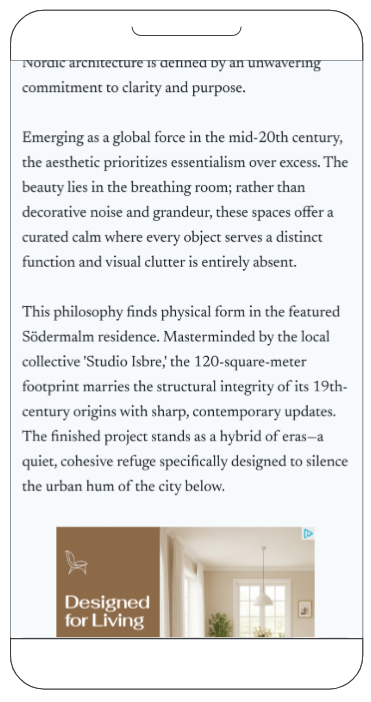
1. Initial View
Source: support.google.com
When a user is reading an article and begins scrolling down the page, the inline banner ad gradually starts to come into view within the content area.
At this stage, the ad becomes visible while still allowing the user to continue reading naturally.
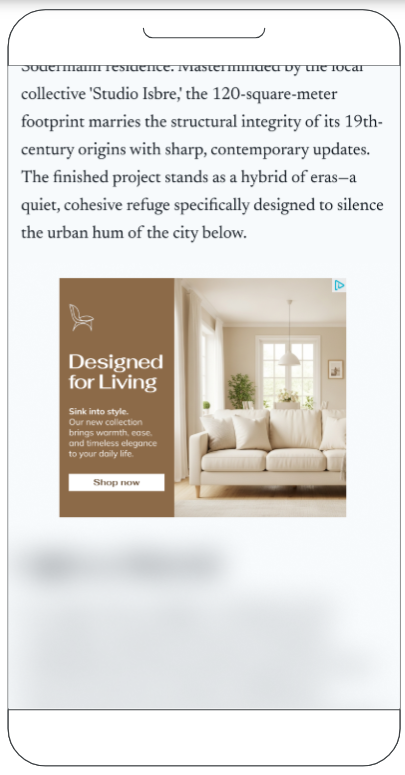
2. Full View
Source: support.google.com
As the user continues scrolling, the banner ad becomes fully visible inside the article content.
The article text continues below the banner, so users can still see the context of the content they are reading.
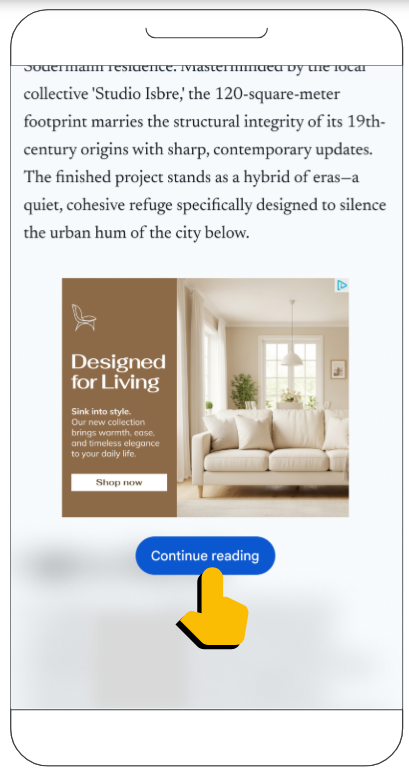
3. Content Pause
Source: support.google.com
When the user tries to scroll further, the article text below the banner becomes blurred, and a “Continue reading” button appears.
At this point, the user cannot continue scrolling until they click the button.
This mechanism helps ensure that the banner ad has a stronger chance of being seen by the user, which can improve important metrics such as ad viewability.
4. Content Unlocked

Source: support.google.com
Once the user clicks the “Continue reading” button, the article text becomes clear again.
The button disappears, and the user can continue scrolling and reading the article normally.
This approach allows publishers to increase ad visibility while still maintaining a smooth and user-friendly reading experience.
Requirements and Eligibility to Use Focused Banner Ads (Beta)
Based on the official Google Ad Manager documentation, there are several requirements for publishers to use this format.
1. Using Standard Inline Banner Traffic
Focused Banner Ads are available for publishers who use standard inline banner ads on their websites.
Inline banners are banners placed directly within the page content, for example:
- between article paragraphs
- within the main content area
- in the middle section of a page
This format is designed to work on banner slots that already exist on the page.
2. Supports All Deal Types and Demand Sources
Focused Banner Ads support various types of ad demand sources in Google Ad Manager, including:
- programmatic demand
- direct deals
- preferred deals
- private marketplace
With this support, publishers do not need to change the monetization structure they previously used.
3. Suitable for Websites with Text-Based Content
Google states that this format is designed for publishers who have:
- web inventory with regular inline banner slots
- pages with fairly long text content
Websites such as news portals, blogs, or editorial sites usually have content structures that are suitable for this format.
4. Supports Mobile Web and Desktop
Focused Banner Ads can run in two main environments:
- mobile web
- desktop
This allows publishers to display this format to users across multiple devices.
How to Implement Focused Banner Ads on a Website
Publishers can try the Focused Banner Ads (Beta) format by adding certain configurations to the Google Publisher Tag (GPT) ad tag on the ad units they want to test.
Here are the implementation steps based on Google Ad Manager documentation.
1. Determine the Ad Unit You Want to Use
Publishers need to determine which banner ad unit they want to use to test the Focused Banner Ads format.
Usually, these ad units are standard banners such as:
- 300×250
- 336×280
- 728×90
These ad units must be inline banner slots located within the page content of the website.
2. Add Focused Banner Configuration to the Ad Tag
Specify the ad unit(s) where you’d like to test the format by inserting the following tag:
Example implementation of the tag used:
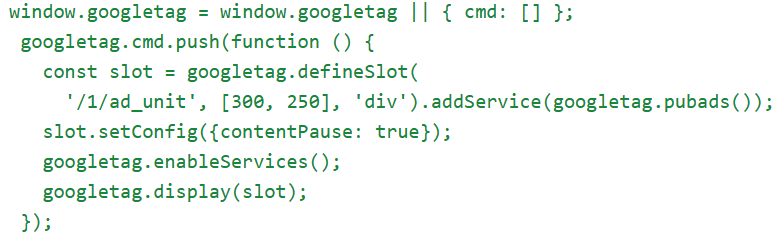
This configuration signals Google’s system to apply focused banner ad treatment to the specified ad unit.
3. Focused Banner Ads Will Be Applied to the Ad Unit
After the configuration is applied, the Google Ad Manager system will apply focused banner ad treatment to the specified ad unit.
This means the banner will be processed with an approach designed to improve ad visibility on the page.
Publishers can then monitor ad performance through reports in Google Ad Manager to see the impact on metrics such as:
- ad impressions
- Viewability
- display ads performance
If publishers want to try Focused Banner Ads (Beta) but are not yet confident with GPT tag implementation or Google Ad Manager settings, the ProPS team can help with the setup and testing process for this format on publisher websites.
Why Should Publishers Pay Attention to This Update?
Google regularly updates its advertising ecosystem.
For publishers who rely on advertising as a source of revenue, understanding updates like this is important because they can affect:
- ad performance
- monetization strategies
- ad placement settings on the website
However, not all publishers have the time to continuously monitor every change that occurs.
For this reason, many publishers choose to work with monetization partners such as ProPS who can help monitor updates from Google while also optimizing ad settings on the website.
With the right approach, updates like Focused Banner Ads can actually become an opportunity to improve website monetization performance.
Conclusion
Banner ads remain one of the most widely used advertising formats on websites. To improve their effectiveness, Google introduced an update called Focused Banner Ads (Beta) in Google Ad Manager.
This update aims to make banner ads more visible to users. For publishers, this change has the potential to increase viewability and website monetization performance.
By understanding updates like this, publishers can continue adjusting their advertising strategies to remain optimal amid the development of the digital advertising ecosystem.
If you want to try or optimize banner ads for web or Focused Banner Ads in Google Ad Manager, ProPS is ready to help with the setup process, optimization, and monitoring of ad performance on your website.
FAQ
- What are Focused Banner Ads for Web (Beta)?
Focused Banner Ads are a new banner format in Google Ad Manager designed to increase ad visibility on websites. - What is the main purpose of this format?
To increase the likelihood that banner ads are actually seen by users. - Can all publishers already use this feature?
Not necessarily, because this feature is still in the Beta stage and is being gradually released by Google. - Where can this format be used?
Focused Banner Ads can be used on mobile web and desktop websites. - Does this format require changes to the ad structure?
Not always. This format can be used on inline banner ad slots that already exist on the website page.